How to Download Twitter Videos on iPhone, Android & PC
November 7, 2026 · 11 min read
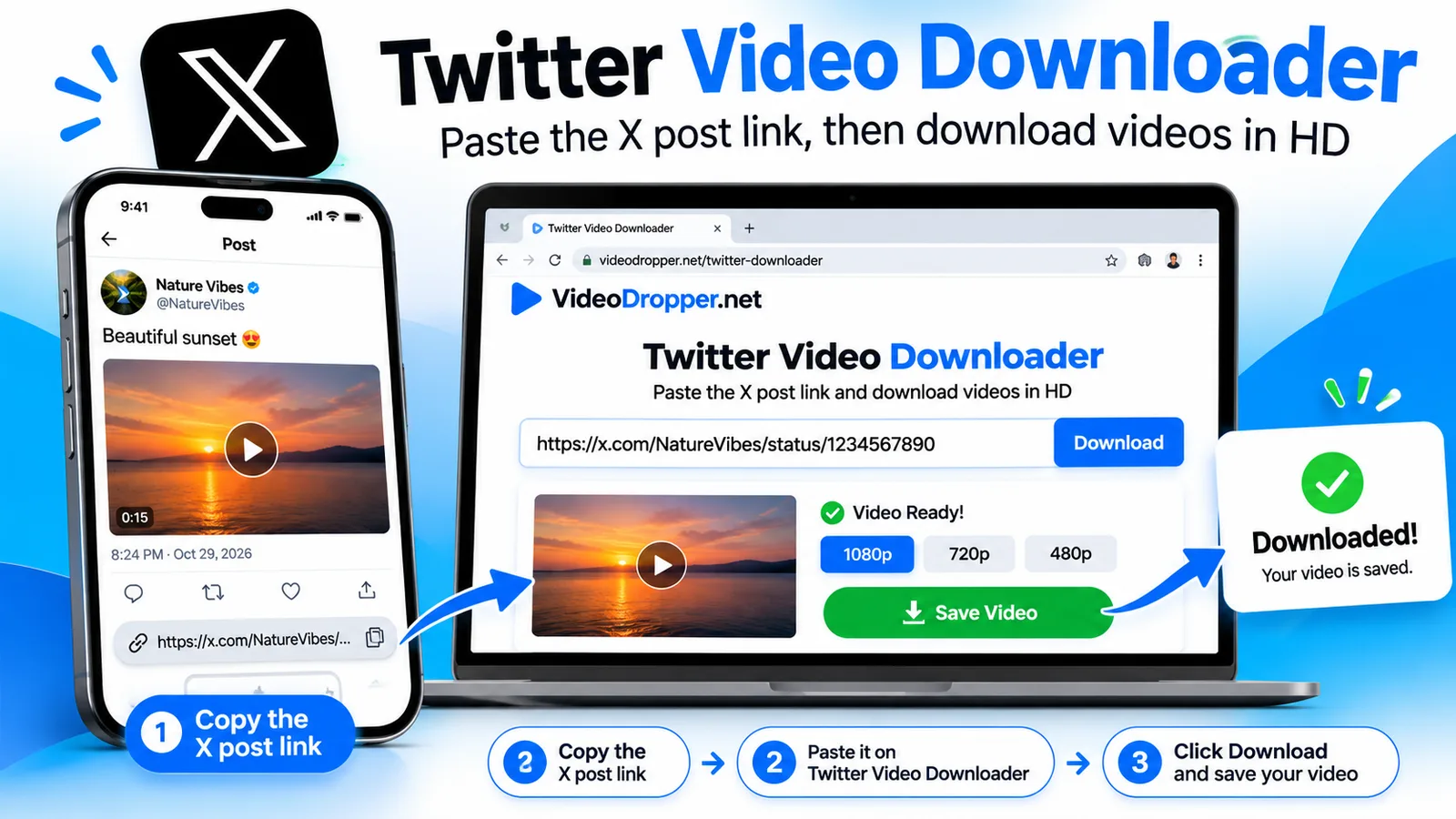
If you're wondering how to download Twitter videos, the short version is this: X (formerly Twitter) has no download button for most videos, so you copy the post link, paste it into a Twitter video downloader and save the MP4. It takes about a minute on an iPhone, an Android phone or a PC, and you don't need an app or an account.
This guide covers every method that works today, including X's own Premium download option, step-by-step instructions for each device, and fixes for the errors people run into most. The steps use the free VideoDropper Twitter video downloader, which reads public posts from both x.com and twitter.com.
How to Download Twitter Videos: The Short Answer
To download a Twitter video, copy the link of the post, paste it into a web-based downloader and tap Download. The same five steps work on every device.
- Open the post in the X app or on x.com, tap the share icon and choose Copy link.
- Open the Twitter video downloader in your browser.
- Paste the link into the box.
- Check the preview to confirm it is the right video.
- Tap Download to save the MP4.
On Android and PC the file lands in your Downloads folder. On an iPhone it goes to the Files app, and the iPhone section below shows how to move it into Photos.
Does X Let You Download Videos? The Official Option
Yes, but only partly. According to X's own video help page, Premium subscribers can download videos from certain posts for offline viewing. The keyword is "certain". Paying for Premium does not unlock every video.
The Download video option appears only when all of these are true:
- You are subscribed to X Premium.
- The video was posted on or after July 25, 2023.
- The uploader left the Allow video to be downloaded setting on when writing the post.
Uploaders can't change that setting after posting. If a creator wants downloads off later, the only way is to delete the post.
When a video qualifies, open the post, tap the three-dot menu and choose Download video. If that item is missing, one of the three conditions above is not met, and a third-party X video downloader is the practical alternative for public posts.
How to Use a Twitter Video Downloader, Step by Step
A Twitter video downloader takes the public link of a post, finds the video files X stores for it and gives you a normal MP4. Here is the full process in more detail.
Step 1: Copy the post link
In the X app, tap the share icon under the post and pick Copy link. On a computer, copy the address from the browser bar. Both x.com and twitter.com links work.
Step 2: Paste it into the downloader
Go to the X video downloader on VideoDropper and press Paste, or drop the link into the box. The tool checks the post and shows a preview.
Step 3: Choose what to save
If the post has one video, you get one Download button. If it has several videos, each one gets its own button. GIFs and photos in the post show up as separate downloads too.
Step 4: Download and find the file
Tap Download and your browser saves the file. Nothing to install, and you never enter your X password.
How to Save Twitter Video to iPhone
To save a Twitter video to iPhone, copy the post link in the X app, paste it into a downloader in Safari and tap Download. iOS saves browser downloads to the Files app first, which confuses many people because nothing appears in Photos yet.
- In the X app, tap the share icon under the video and choose Copy link.
- Open Safari and go to the Twitter video downloader.
- Paste the link and wait for the preview.
- Tap Download, then confirm the prompt that asks to download the file.
- Tap the downloads icon in Safari's address bar to open the file, or find it in Files > Downloads.
To move it into your camera roll, open the Files app, press and hold the video, tap Share and choose Save Video. The clip will then play from Photos like any video you recorded. The same steps work on an iPad.
How to Download Twitter Videos on Android
On Android you only need Chrome or any other browser. Copy the link in the X app, paste it into the downloader and tap Download.
- Open the post in the X app, tap the share icon and choose Copy link.
- Open Chrome and visit the Twitter video downloader.
- Paste the link and tap Download under the video you want.
The MP4 goes to your Downloads folder and usually shows up in your gallery within a few moments. If it doesn't, open your Files app and check Downloads. Skipping extra apps is also safer, since many "downloader" apps ask for permissions they don't need.
How to Download X Videos on PC and Mac
On Windows, Mac or Linux, open the post in your browser, copy the address from the address bar and paste it into the downloader. Click Download and the browser saves the MP4 to its usual downloads folder.
Right-clicking an X video and choosing "Save video as" doesn't work, because the player streams the clip instead of linking to a plain video file. That is the main reason people look for an X video downloader in the first place. You can change where files are saved in your browser's download settings.
Tweet Video to MP4: Quality, GIFs and MP3
You don't need to convert anything. A good downloader already gives you a tweet video to MP4 file, which plays on phones, laptops, TVs, editing apps and messengers. Here is what you can expect from each type of media.
| Post contains | You get | Notes |
|---|---|---|
| Video | MP4 with sound | The largest version X stores for that clip |
| GIF | Short MP4 | X stores GIFs as silent MP4 files |
| Photos | JPG | Original size |
| Video with sound | MP3 at 320 kbps | Optional audio-only download |
Quality depends on the upload. X often keeps several sizes of the same video, and the downloader picks the biggest one, but it can't go above what the author uploaded. A low-resolution clip stays low resolution.
Which Download Method Should You Use?
There are three realistic ways to get a video off X. The right one depends on whose video it is.
| Method | Cost | Best for | Limits |
|---|---|---|---|
| X Premium "Download video" | Paid subscription | Eligible posts, official route | Only certain posts; nothing before July 25, 2023 |
| Web downloader (VideoDropper) | Free | Any public post on any device | Public posts only; short per-minute limit |
| X data archive | Free | Your own uploaded videos | Your account only; takes time to prepare |
For most people saving someone else's public clip, the web downloader is the fastest option. For your own uploads, request your archive from X's account settings if you've lost the original file.
Why a Twitter Video Won't Download, and How to Fix It
Most failures come down to a handful of causes. Check these first.
- "Post not found." The post is deleted, belongs to a protected account or has no video, GIF or photo. A downloader only reads public posts and never logs in to X, so private content can't be reached.
- The video is inside a quote post. Media inside a quoted post isn't read. Paste the link of the original post instead.
- It worked, then stopped. A short per-minute limit keeps the service quick for everyone. Wait a minute and try again.
- You can't find the file on iPhone. Open the Files app and look in Downloads, or tap the downloads icon in Safari.
- The quality looks soft. The author uploaded a low-resolution video. No tool can add detail that was never there.
- The official Download video option is missing. Check the three conditions in the Premium section above: subscription, post date and the uploader's setting.
Is It Legal and Safe to Use an X Video Downloader?
This isn't legal advice, but the practical rule is simple: saving a public video for your own reference is very different from reposting it as yours. The creator owns the video. Ask permission and give credit before you reuse, edit or share someone else's work, and keep X's terms of service in mind.
For safety, follow these habits:
- Never type your X username or password into a downloader. A legitimate tool only needs a public link.
- Skip tools that make you install an extension or app that asks for access to your contacts, location or messages.
- Use a downloader that states it doesn't keep your files. VideoDropper says it doesn't log in to any account and doesn't store downloaded files.
Frequently Asked Questions
How do I download Twitter videos for free?
Copy the post link from X, paste it into a free Twitter video downloader such as VideoDropper and tap Download to save the MP4. It works for public posts, needs no account and runs in any modern browser.
Can I save a Twitter video to my iPhone camera roll?
Yes. Download the video in Safari, open the Files app, press and hold the video, tap Share and choose Save Video. The clip then appears in Photos.
Can you download videos from X without Premium?
Yes. X's built-in Download video option is for Premium subscribers and eligible posts only, but a third-party downloader can save videos from public posts without Premium.
How do I convert a tweet video to MP4?
You don't have to convert it. A downloader saves the video as an MP4 file directly. GIFs are saved as short MP4 clips without sound.
Why can't I download a video from a private account?
A downloader only reads public posts and never logs in to X, so protected accounts and deleted posts can't be reached. Ask the account owner to send you the file instead.
Is it legal to download Twitter videos?
Saving a public video for personal viewing is common, but the creator still owns it. Get permission and give credit before you repost, edit or use it commercially, and follow X's terms of service. This is general information, not legal advice.
Does a Twitter video downloader work with x.com links?
Yes. Links from both x.com and twitter.com work, so you can paste whichever one the share menu gives you.
Save Your Next X Video in Under a Minute
Knowing how to download Twitter videos comes down to one routine: copy the link, paste it, tap Download. Use X's Premium option when the post allows it, and a free X video downloader for everything else. Keep your downloads for personal reference and credit the creator if you share.
Ready to try it? Paste a link into the Twitter video downloader now. The same copy-and-paste routine also works for Instagram, so you can use the Instagram Reels downloader for short clips or head to the VideoDropper home page for every supported platform.